

En esta noticia
The Internal Revenue Service (IRS) has launched a new mobile app that replaces IRS2Go and gives taxpayers access to more digital services from their smartphones. The free application allows users to check refund statuses, make payments, view tax records, and access selected features previously available through their online accounts.
The app is available in the Apple App Store and Google Play. Existing IRS2Go users do not need to download a separate application if automatic updates are enabled on their devices.
What can taxpayers do with the new IRS app?
The application expands access to individual tax account services, allowing users to manage several tasks without having to navigate the IRS website for every transaction. Its main features include:
- Check federal tax refund and amended-return statuses.
- View available balance information and payment history.
- Make payments toward outstanding tax balances
- Read selected IRS notices and letters.
- Access tax records, transcripts, and information return documents.
- Manage certain profile and communication preferences.
- Retrieve an Identity Protection PIN (IP PIN) to help protect against tax-related identity theft.
Some features require users to sign in and verify their identity. The app does not replace IRS.gov, and services for business tax accounts and tax professionals remain available through the agency’s website.
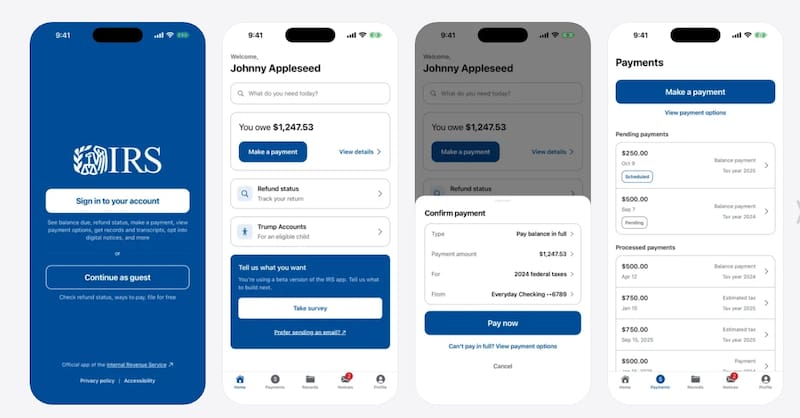
How to download and use the IRS mobile app
Taxpayers can follow these steps to access the application and its digital tools:
- Download or update the app: Search for the official IRS app in the Apple App Store or Google Play. Existing IRS2Go users with automatic updates enabled should receive the new version automatically.
- Open the application: Select the service you need, such as checking a refund or accessing your tax account.
- Sign in to your account: To use account-specific features, log in with your IRS Individual Online Account credentials and complete identity verification through ID.me if prompted.
- Choose a service: Review your balance, make a payment, access available tax records, or read IRS notices and letters.
- Check your information: Review the details displayed in the app and follow the instructions provided to complete the selected task.
Taxpayers should download the application only through official IRS links or verified app store listings. The agency warns users to avoid look-alike apps and unsolicited messages requesting sensitive personal or financial information.
For additional instructions and access to the official download links, visit the IRS’s mobile app page.